git同步两个云端仓库
干货!Git 如何使用多个托管平台管理代码 - 几个我 - 博客园
背景
首先,我们在开始一个项目时,在本地写了一些代码,需要同时托管到 github 和码云(gitee)上。这个时候我们要怎么办呢?请接着看。
实现方法
添加密钥对
在 C:\Users\robin.ssh 目录下运行 git bash
// 这个是给github生成的
ssh-keygen -t rsa -C "1148121254@qq.com"
// 这个是给码云生成的
ssh-keygen -t rsa -C "cumtrobin@163.com"
生成后自行命名管理,这里不再赘述。接着把公钥分别放在 github 和码云上。私钥可以用 config 文件管理
# 配置github.com
Host github.com
    HostName github.com
    IdentityFile C:\\Users\\robin\\.ssh\\id_rsa_github
    PreferredAuthentications publickey
    User cumtRobin

# 配置gitee.com
Host gitee.com
    HostName gitee.com
    IdentityFile C:\\Users\\robin\\.ssh\\id_rsa_gitee
    PreferredAuthentications publickey
    User Tusi
接着我们测试一下
ssh -T git@github.com
ssh -T git@gitee.com
成功则会得到这样的反馈

创建仓库
首先是在 github 和码云上分别创建一个仓库。这个玩过 github 的都知道,不细说。
接着在本地项目根目录创建 git 仓库
git init
本地与 remote 关联
要把两个 remote 仓库与本地 git 仓库关联起来,我们直接来运行
// 添加github的远程库
git remote add origin git@github.com:cumtRobin/BlogFrontEnd.git
// 添加码云的远程库
git remote add gitee git@gitee.com:tusi/BlogFrontEnd.git
然后我们运行 git remote 查看添加的远程库列表
git remote
// 得到以下值
origin
gitee
说明已经添加成功,接着我们分别查看 git status,会看到本地有很多文件待提交,接着 git add, git commit,最后 git push 的时候要注意分开 push
// push到github主分支
git push origin master
// push到gitee主分支
git push gitee master
虽然麻烦了一点,需要 push 两次,但是目的是初步达成了。如果想要一次性 push 解决,那也不是没有办法。
一次性 push
为了避免引起歧义,这里先将 origin,gitee 的 remote 库删除
git remote rm origin
git remote rm gitee
重新添加 remote
git remote add all git@github.com:cumtRobin/BlogFrontEnd.git
可以看到,我其实是添加的 github 的远程库,只不过把它的名字叫做 all。接着我们把码云上的 remote 库也关联起来。
git remote set-url --add all git@gitee.com:tusi/BlogFrontEnd.git
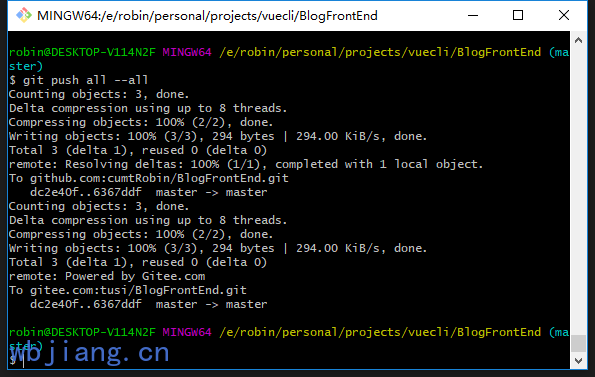
这样操作以后,就可以运行一条 push 命令了
git push all --all
有人说可以改.git/config 文件实现。其实刚才上面的命令修改的就是 config 文件,但是本人建议,多练练命令行,这样也会加深对 git 的理解。这时候我们再查看一下.git/config 文件。可以看到 remote all 下面是有两个 url 的。
[core]
	repositoryformatversion = 0
	filemode = false
	bare = false
	logallrefupdates = true
	symlinks = false
	ignorecase = true
[remote "all"]
	url = git@github.com:cumtRobin/BlogFrontEnd.git
	url = git@gitee.com:tusi/BlogFrontEnd.git
学会了两个托管平台的配置,那使用更多的托管平台也就不难实现了。
ps:再分享一个小技巧,由于我在生成 ssh 密钥时,加了 passphrase,导致我每次 push 都要输入密码,很烦人。
其实,只要重置一下这个 passphrase 就可以了。
// 进入到.ssh目录,运行git bash

ssh-keygen -p

// 再输入密钥名,如id_rsa_github,先输入旧密码,然后一路回车即可,多个密钥重复此操作即可。
2019-04-18
- 补充
git pull的细节
因为都是从本地 push 代码到远程仓库,很久没有从远程仓库拉取代码了,今天不小心在 github 上改了仓库中的 readme 文件,导致和 gitee 不同步。使用 git pull 报错,慌的一批。
$ git pull
There is no tracking information for the current branch.
Please specify which branch you want to merge with.
See git-pull(1) for details.

    git pull <remote> <branch>

If you wish to set tracking information for this branch you can do so with:

    git branch --set-upstream-to=all/<branch> master
原来是要使用下面这条命令才行。
$ git pull all master
From github.com:cumtRobin/BlogFrontEnd
 * branch            master     -> FETCH_HEAD
Already up to date.